
Overview
The Brightcove AirPlay plugin allows you to stream video from your Brightcove Player to high-definition displays with Apple TV. Simply tap the AirPlay icon from Brightcove Player to share movies and videos to your Apple TV or AirPlay 2–enabled smart TV.
Note that the AirPlay icon in the player controlbar, as shown below, will only appear if the following apply:
- Your Brightcove Player is in the Safari browser
- This Brightcove AirPlay plugin has been added to your player
- The Safari built-in Webkit for AirPlay is available

Requirements
The following requirements are needed to use the Brightcove AirPlay plugin:
- Brightcove Player v6.51.4 and newer
How it works
When using the AirPlay plugin with Brightcove Player, requests for media assets are made as follows:
- When using AirPlay, AppleTV or other airplay devices get the manifest url and handle asset downloading
- When using AirPlay mirroring, the player on the sending device makes the video requests and downloads
Implement using Studio
The easiest way to configure your player with the Brightcove AirPlay plugin is with Video Cloud Studio.
- In Video Cloud Studio, navigate to the Players module.
- Open an existing player or create a new one.
- Expand the Plugins section on the Overview tab.
- Click Add Plugin and select Brightcove Plugin.
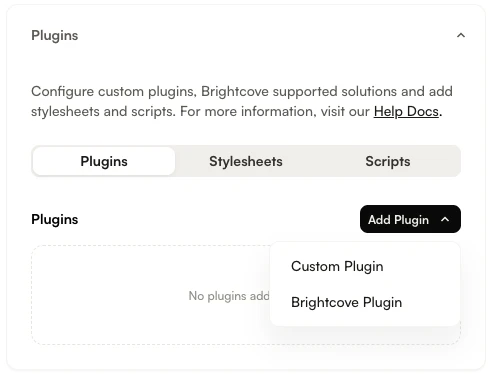
Add Plugin dropdown - From the Brightcove Plugin dropdown, select AirPlay.
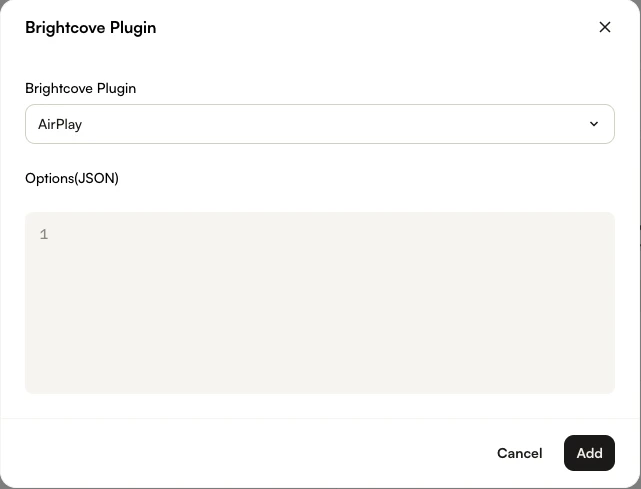
AirPlay Plugin selected - Select Add.
- Publish your player by clicking Publish Changes.
Implement Manually
For players 7.26.0 and newer, you can also follow these steps to add the plugin using the JSON editor:
In the Players module, navigate to the player you want to configure and click the JSON Editor accordion on the Overview tab.
Modify the "plugins" array to add the AirPlay plugin.
    "plugins": [
    {
      "name": "airplay",
      "is_packaged": true,
      "options": {
        ...
      }
    }
  ]
Changelog
For historical release notes and changelog up to v2.0.1, see the AirPlay Plugin Releases.
Notable changes made after version v2.0.1 will be included in the Brightcove Player Release Notes.